Quick Answer
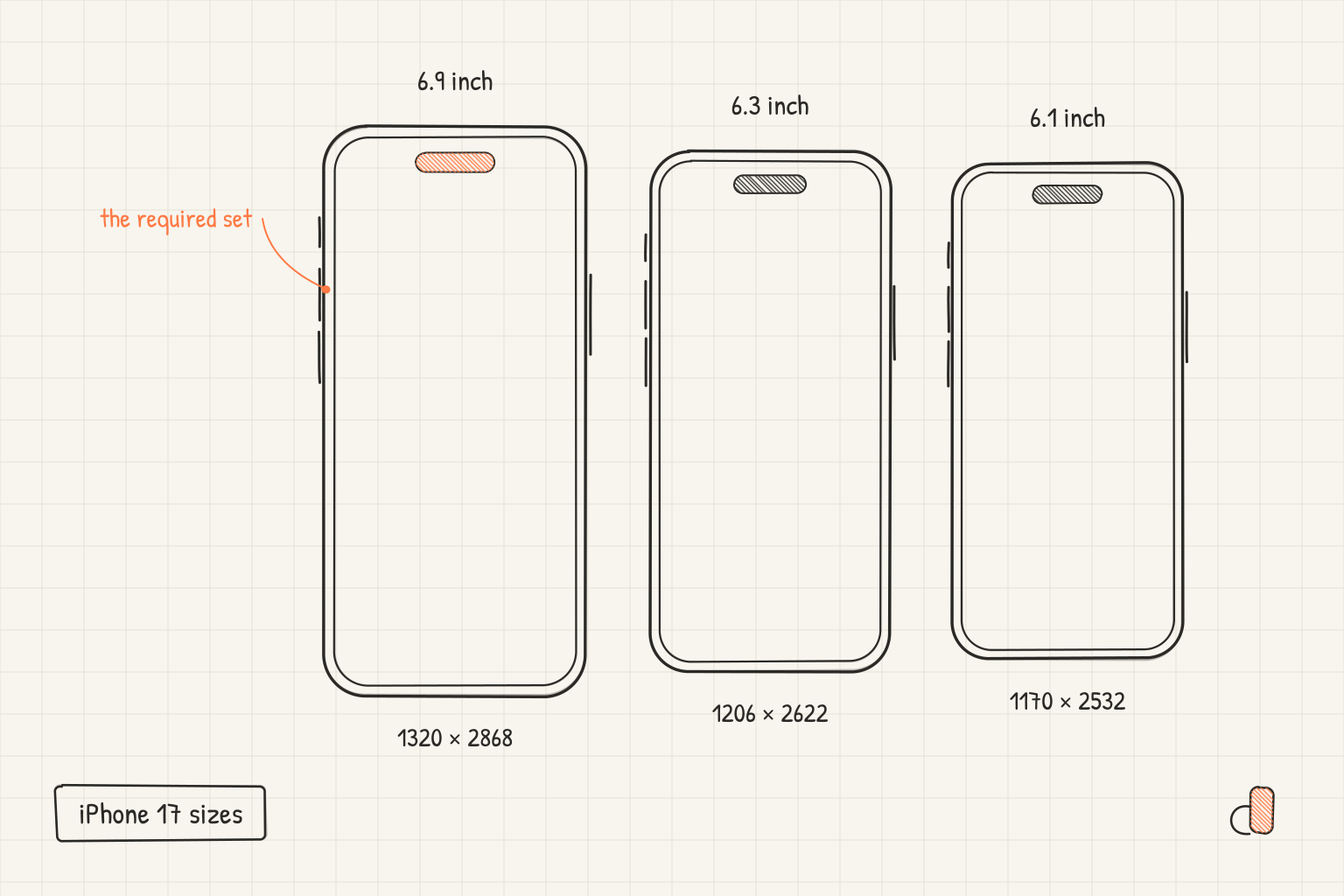
Every current iPhone falls into one of three App Store screenshot classes. The iPhone 17 Pro Max, iPhone 18 Pro Max and iPhone Air are 6.9-inch devices and take 1320 × 2868 px (1290 × 2796 and 1260 × 2736 are also accepted). The iPhone 17, 17 Pro and 18 Pro are 6.3-inch devices and take 1206 × 2622 px (or 1179 × 2556). The iPhone 17e is a 6.1-inch device and takes 1170 × 2532 px (or 1125 × 2436 and 1080 × 2340). The iPhone Duo has its own two sizes, 2007 × 2853 for the inner display and 1398 × 2034 for the cover. Only the 6.9-inch set is required; App Store Connect scales it for the rest.
The 2026 iPhone Lineup, One Table
Apple's screenshot specifications page organises iPhones by display class rather than by model, which is why a search for "iPhone 17 Pro screenshot size" never gets a straight answer. Here is the same information by model. Landscape is the same pixels the other way round.
| iPhone | Display class | Portrait sizes accepted |
|---|---|---|
| iPhone 18 Pro Max | 6.9" | 1320 × 2868, 1290 × 2796, 1260 × 2736 |
| iPhone 17 Pro Max | 6.9" | 1320 × 2868, 1290 × 2796, 1260 × 2736 |
| iPhone Air | 6.9" | 1320 × 2868, 1290 × 2796, 1260 × 2736 |
| iPhone 18 Pro | 6.3" | 1206 × 2622, 1179 × 2556 |
| iPhone 17 Pro | 6.3" | 1206 × 2622, 1179 × 2556 |
| iPhone 17 | 6.3" | 1206 × 2622, 1179 × 2556 |
| iPhone 17e | 6.1" | 1170 × 2532, 1125 × 2436, 1080 × 2340 |
| iPhone Duo (inner) | Duo | 2007 × 2853 |
| iPhone Duo (cover) | Duo | 1398 × 2034 |
The bold value in each row is the native resolution of the newest device in that class, and the one to export at when you have a choice. The alternatives exist because earlier phones in the same class had slightly different panels; App Store Connect accepts any of them for the whole class.
Which Sets You Actually Have to Upload
One. The 6.9-inch set is the only required iPhone set. Upload it and App Store Connect uses scaled versions of those images for every class you leave empty, so an app with nothing but a 6.9-inch set has a complete listing on the iPhone 17, the 17e and everything older.
Everything else is optional, and Apple's page says what happens when a class is missing: the store falls back to scaled screenshots from a larger class. In practice you add a 6.3-inch set only when you want the standard-sized iPhones to show something hand-tuned rather than scaled, and a 6.1-inch set almost never.
The iPhone Duo is the exception to "one set covers everything", not because Apple requires it but because scaling a tall phone screenshot onto a nearly square inner display looks poor. The iPhone Duo screenshot sizes post covers that separately.
Design Once, Export for Both
The useful fact hiding in the table: the 6.9-inch and 6.3-inch canvases have the same shape. 1320 × 2868 is 0.4603 wide-to-tall, 1206 × 2622 is 0.4600, and the 17e's 1170 × 2532 is 0.4621. The difference is under half a percent, invisible at any size a screenshot is ever shown at.
So a layout built for the 6.9-inch canvas exports at 6.3 inches without a single element moving. Headline position, device placement, background, all of it holds. If you want a 6.3-inch set at all, it is one extra export from the same project, not a second design.
The only thing that changes between the two is pixel density: text that reads at 1206 pixels wide reads at 1320, so design at the smaller size if you want to be sure of legibility, then export both.
The iPhone Air Is a 6.9-inch Device
This one catches people. The iPhone Air is the thin phone, and its display class is the large one: it shares the 6.9-inch entry with the 17 Pro Max and 18 Pro Max, and takes 1320 × 2868. There is no separate Air size, and there is no 6.5-inch set to make for it. Your 6.9-inch set is your Air set.
Where the 17e Sits
The iPhone 17e joins the 6.1-inch class alongside the 16e and the iPhone 14, at 1170 × 2532. Like every class below 6.9 inches it is optional, and it is the one most people can safely leave to scaling: it is the entry phone, it shares a class with three-year-old devices, and the scaled 6.9-inch screenshot looks right on it because the aspect ratio matches.
Export at These Sizes for Free
All of these dimensions are presets in the appdesigns editor, and each link below opens it already set to the size:
- 1320 × 2868, the 6.9-inch set for the 17 Pro Max, 18 Pro Max and Air
- 1206 × 2622, the 6.3-inch set for the 17, 17 Pro and 18 Pro
- 1170 × 2532, the 6.1-inch set for the 17e
- 2007 × 2853, the iPhone Duo, with the cover size one fold state away
Frames for the iPhone 17, 17 Pro, 17 Pro Max, Air, 18 Pro, 18 Pro Max and Duo are in the device picker in their real colours, and the device tilt, background and headline tools are the same across all of them. Exports come out flattened at the exact canvas size, with no watermark, no export limit and no account required.
For the older iPhone classes, iPad, Mac and Apple Watch, the screenshot size reference has every accepted dimension, and the App Store screenshot size guide covers formats and the ten-screenshot limit.
Frequently Asked Questions
What is the iPhone 17 Pro App Store screenshot size?
1206 × 2622 pixels in portrait (2622 × 1206 landscape). The iPhone 17 Pro is a 6.3-inch class device, which also accepts 1179 × 2556. You do not have to upload a 6.3-inch set; App Store Connect scales your 6.9-inch set for it.
What is the iPhone 17 Pro Max App Store screenshot size?
1320 × 2868 pixels in portrait (2868 × 1320 landscape). The 17 Pro Max is a 6.9-inch class device, the one class every iPhone app must have a set for. 1290 × 2796 and 1260 × 2736 are also accepted for the class.
What screenshot size does the iPhone Air use?
1320 × 2868. The iPhone Air is in the 6.9-inch class with the Pro Max models, so the 6.9-inch set covers it.
What is the iPhone 17e screenshot size?
1170 × 2532 pixels, the 6.1-inch class, which also accepts 1125 × 2436 and 1080 × 2340. It is optional; the scaled 6.9-inch set is used when it is missing.
Do I need different screenshots for the iPhone 18 Pro?
No. Apple lists the iPhone 18 Pro in the 6.3-inch class and the 18 Pro Max in the 6.9-inch class, the same sizes as the 17 Pro and 17 Pro Max. A set made for the 17 family is already a set for the 18 family.
Can I use one design for the 6.9-inch and 6.3-inch sets?
Yes. The two canvases differ in aspect ratio by less than half a percent, so the same layout exports at both sizes with nothing moved.