iPhone Duo App Store Screenshot Sizes: Inner and Outer Display Dimensions (2026)
Quick Answer
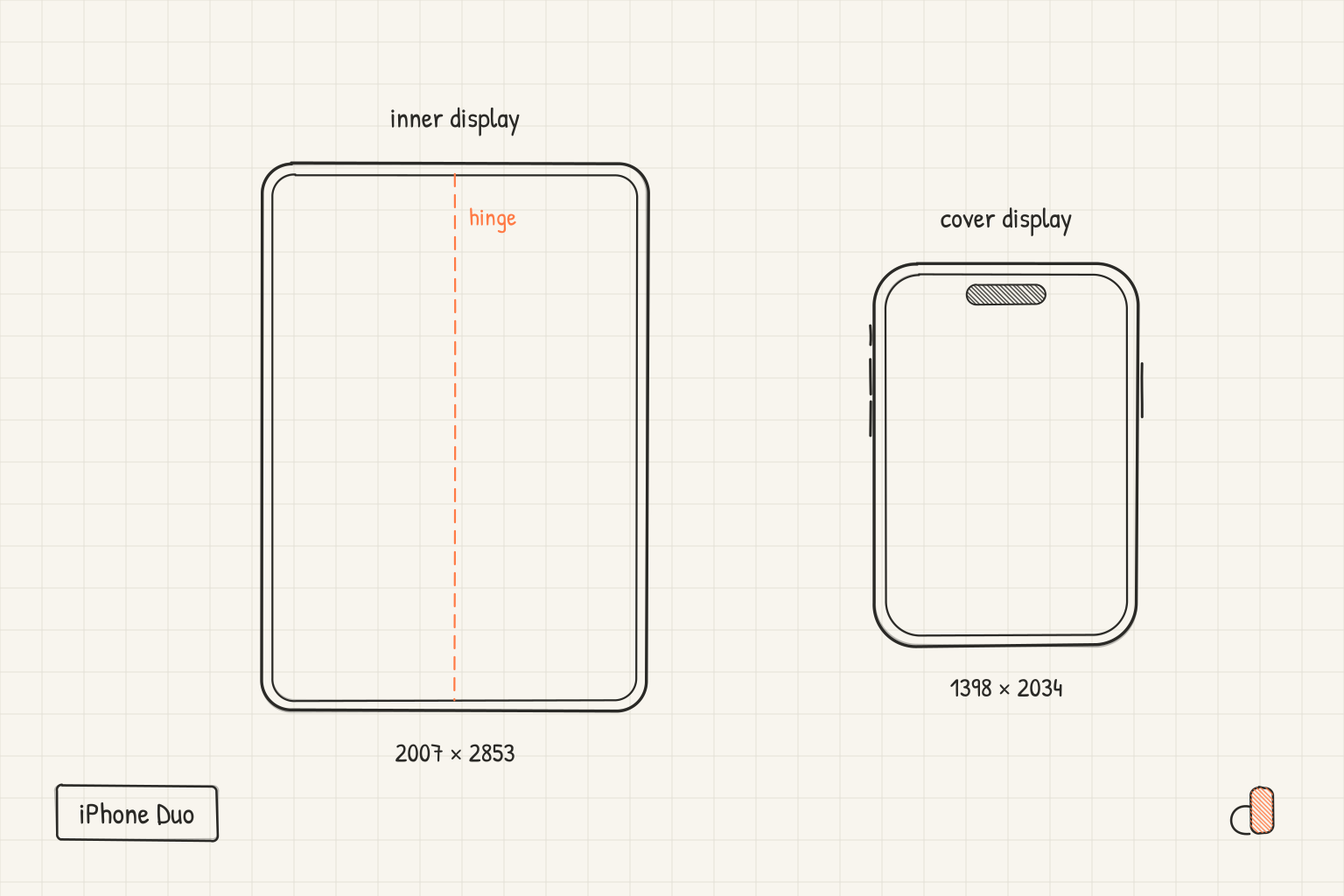
The iPhone Duo has two App Store screenshot sizes, one per display. The inner display takes 2007 × 2853 px in portrait or 2853 × 2007 px in landscape. The outer (cover) display takes 1398 × 2034 px in portrait or 2034 × 1398 px in landscape. Apple added both to the App Store Connect screenshot specifications on 9 September 2026, the day the iPhone Duo was announced, as their own entry at the top of the iPhone list. The Duo sizes are an addition to your iPhone set, not a replacement, and Apple's specifications say that starting in April 2027 they will be required for any app using the iOS 27.1 SDK or later.
What Apple Published
Apple's screenshot specifications page groups iPhones by display class: 6.9-inch, 6.5-inch, 6.3-inch and so on down to the 3.5-inch iPhone 4. A folding phone does not fit that scheme, because it has two displays with two different shapes, so the iPhone Duo gets a row of its own, listed before the display classes rather than inside one.
That row names four accepted sizes:
| Display | Orientation | Pixels | Aspect ratio |
|---|---|---|---|
| Inner (unfolded) | Portrait | 2007 × 2853 | about 7:10 |
| Inner (unfolded) | Landscape | 2853 × 2007 | about 10:7 |
| Outer (cover) | Portrait | 1398 × 2034 | about 9:13 |
| Outer (cover) | Landscape | 2034 × 1398 | about 13:9 |
The general rules are unchanged: PNG or JPEG, no alpha channel, one to ten screenshots per size, per localization.
Why the Two Displays Are Not Interchangeable
Look at the aspect ratios. A normal iPhone screenshot is close to 9:19.5, a tall narrow rectangle at roughly 0.46 wide-to-tall. The Duo's inner display is about 0.70, which is nearer to an iPad (0.75) than to any phone. The cover display is about 0.69, wider than a phone but taller than the inner panel.
That has two consequences for the screenshots themselves.
First, a phone layout does not survive the move. A design built around a tall device frame with a headline above it leaves a wide empty band on either side of the frame when the canvas is 7:10, and the headline, sized for a 1320-pixel-wide canvas, turns small. The unfolded screenshot needs its own composition: a landscape or square-ish app window, a headline that runs wider, and a frame that shows the phone open.
Second, the cover screenshot is not a crop of the inner one. The cover panel is narrower and its corner geometry is different, so the same layout squeezed down loses the headline into the corner radius. Design the unfolded screenshot first, because it has the room, then rebuild rather than crop for the cover.
Do You Have to Upload a Duo Set?
Not yet. As of October 2026, Apple's iPhone Duo entry carries a note: "Starting in April 2027, screenshots will be required for any app using the iOS 27.1 SDK or later." It adds that submitting iPhone Duo screenshots puts a badge on your product page saying the app is optimized for iPhone Duo.
What the store does when a class has no screenshots of its own is the same across the whole table: it shows scaled versions of a set you did upload. For a folding phone that means a tall 9:19.5 screenshot shown on a 7:10 panel, which is the least flattering way to be seen on the one device where your app might look best. If your app is going to run unfolded, and almost every iPhone app will, a real Duo set is worth the afternoon.
Two sets, then: one for the inner display, one for the cover. Ten slots each, the first three doing most of the work in search results, as with every other iPhone class.
How to Make Them in appdesigns
The editor treats the iPhone Duo as one device with three states rather than three devices. Pick the Duo frame and you get a fold control with Unfolded, Cover and Open back. Switching between them changes the frame image, the screen opening and the canvas together, so the unfolded state sits on a 2007 × 2853 canvas and the cover states on 1398 × 2034, without you setting either by hand.
- Open the editor with the Duo already selected: appdesigns.click/?device=iphone-duo. The canvas starts at 2007 × 2853.
- Drop in a screenshot taken on the unfolded display, or any screenshot with a wide aspect ratio. Add the headline and background. Repeat for each screen in the set, up to six per project.
- Export. Every image comes out at exactly 2007 × 2853, flattened, no alpha channel.
- Switch the fold state to Cover. The frame becomes the closed phone and the canvas moves to 1398 × 2034. Swap in cover-sized screenshots, shorten the headlines, and export again.
Both frames come in the two launch colours, Star White and Night Sky, and the screen openings were measured from the device renders, including the asymmetric corners on the cover display where it meets the hinge. Exports are free and unlimited, with no watermark and no account needed to download.
Working at These Sizes
A few things that turn out to matter once you are actually laying out a 7:10 canvas:
- Headline width. On a phone screenshot the headline lives in a narrow column above the device. Unfolded, it can run the full width in one or two lines, and it should: a narrow headline on a wide canvas looks like a mistake.
- Show the fold. The single most informative thing a Duo screenshot can show is that the app uses the extra room: a two-pane layout, a sidebar, a canvas. If the screenshot could have come from a normal iPhone, the Duo slot is wasted.
- Landscape is legitimate here. 2853 × 2007 is an accepted size, and an unfolded Duo held landscape is close to a small iPad. For apps with a horizontal layout, a landscape set can read better than portrait.
- Keep the cover set simple. The cover display is the one people glance at. One idea per screenshot, large type, no fine detail.
For the other iPhone classes and what each one accepts, the screenshot size reference lists every dimension, and the App Store screenshot size guide covers the format rules and the ten-slot limit.
Frequently Asked Questions
What are the iPhone Duo App Store screenshot sizes?
2007 × 2853 pixels (portrait) or 2853 × 2007 (landscape) for the inner display, and 1398 × 2034 (portrait) or 2034 × 1398 (landscape) for the outer display. These are the sizes on Apple's App Store Connect screenshot specifications page.
Is an iPhone Duo screenshot set required?
Not before April 2027. Apple's specifications say that starting then, iPhone Duo screenshots will be required for any app using the iOS 27.1 SDK or later. Without a Duo set the store shows scaled screenshots from a set you did upload, which on a 7:10 display means a tall phone screenshot with wide margins.
Can I upload the same image for the inner and outer display?
No. The two entries accept different pixel sizes, 2007 × 2853 and 1398 × 2034, and App Store Connect validates dimensions exactly. They also have different shapes, so a single design does not serve both well even if it could be uploaded.
What aspect ratio is the iPhone Duo inner display screenshot?
2007 × 2853 is about 7:10, closer to an iPad than to any other iPhone. The cover display at 1398 × 2034 is about 9:13.
Does appdesigns export both Duo sizes?
Yes. The iPhone Duo frame has Unfolded, Cover and Open back states, and the canvas follows the state: 2007 × 2853 unfolded, 1398 × 2034 for the cover. Exports are free, unlimited and need no account.