Quick Answer
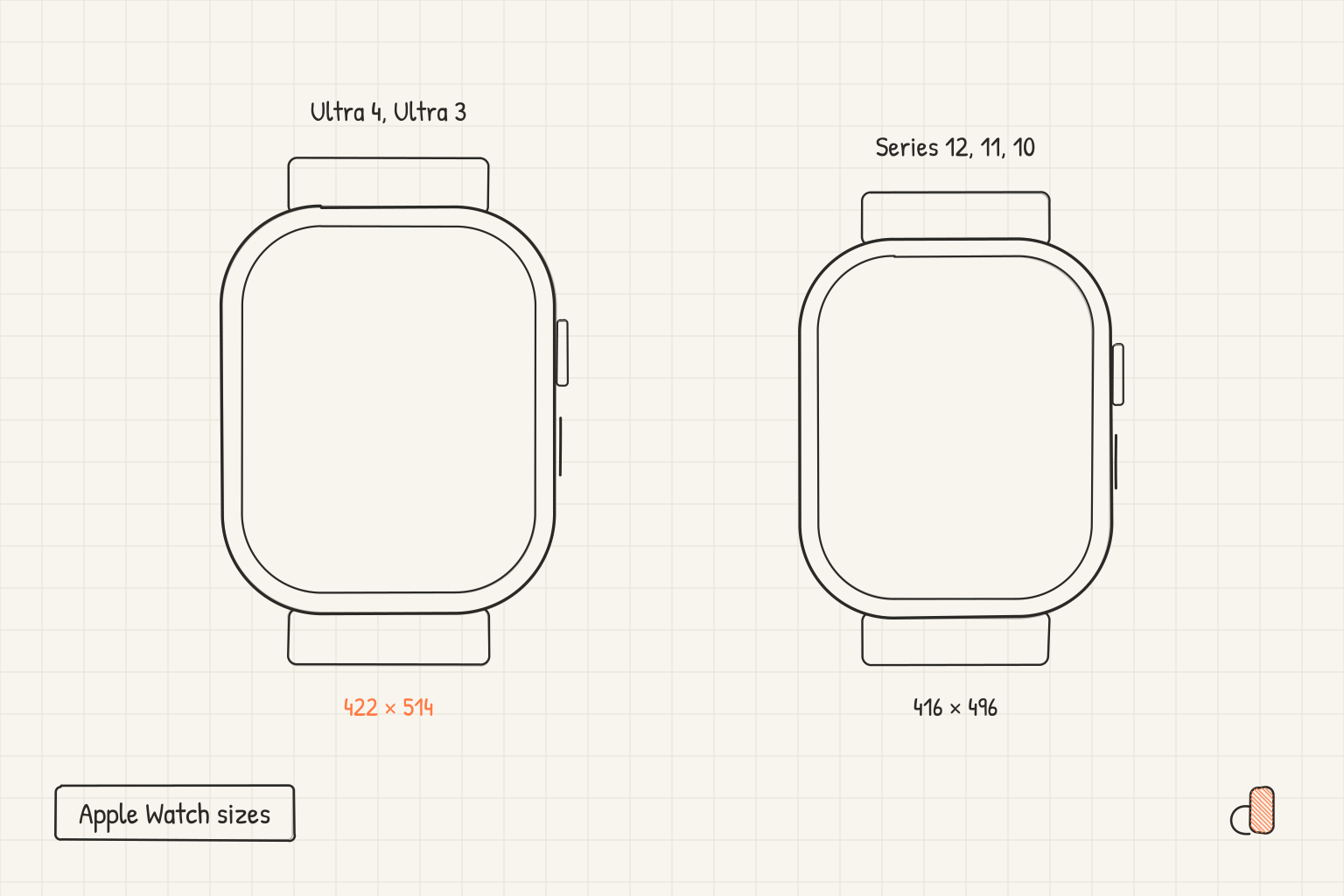
Apple Watch Ultra 4 takes 422 × 514 pixels and Apple Watch Series 12 takes 416 × 496 pixels. Apple added both models to the App Store Connect screenshot specifications on September 9, 2026, the same day it announced the two watches. Neither dimension is a new one: Ultra 4 joined the row Ultra 3 already held, and Series 12 joined Series 11 and Series 10. A screenshot set is required for Apple Watch apps, you can upload one to 10 images, and whichever size you pick has to be used across every localization of the listing.
The six sizes Apple lists
Apple gives Apple Watch a single entry on its screenshot specifications page, with six accepted dimensions. Here they are in the order the page lists them, with the models named against each one.
| Screenshot size | Apple Watch models |
|---|---|
| 422 × 514 | Ultra 4, Ultra 3 |
| 410 × 502 | Ultra 2, Ultra |
| 416 × 496 | Series 12, Series 11, Series 10 |
| 396 × 484 | Series 9, Series 8, Series 7 |
| 368 × 448 | Series 6, Series 5, Series 4, SE 3, SE 2, SE |
| 312 × 390 | Series 3, Series 2, Series 1 |
The page introduces the list with "One of the following" and marks the row "Required for Apple Watch apps". That wording matters: these are not six uploads. They are six candidates for the one watch set your listing carries.
Two details are easy to get wrong. The Ultra line is split across two rows, so an image sized for an Ultra 2 at 410 × 502 is not the size Apple lists for an Ultra 4. And Series 12 gets one size even though Apple's announcement of it says the watch comes in 42mm and 46mm cases. There is no separate 42mm screenshot entry to hunt for, and no separate entry for the two Ultra finishes either.
App Store Connect picked up both models in a documented step. The App Store Connect release notes entry for September 9, 2026 says the app preview and screenshot specifications for iPhone Duo, iPhone 18 Pro Max, iPhone 18 Pro, Apple Watch Ultra 4 and Apple Watch Series 12 have been added. An earlier entry, dated August 19, 2026, says the list of Apple Watch screenshot size specifications is up to date, so the six rows above are the maintained list rather than a leftover.
Which size to upload
Export at 422 × 514. You only get one choice, because Apple's note on the same page says you must use the same screenshot size for Apple Watch consistently across all localizations for the app, and 422 × 514 is the largest of the six rows. It is 6 pixels wider and 18 pixels taller than 416 × 496, and larger than every other row on the list, so it is the version of your artwork that carries the most pixels. Apple's page does not say how the store renders one watch size on a watch from a different row, which is another reason to submit the biggest accepted canvas and keep the composition tolerant of a small change in shape.
Tolerant is not much of an ask here, because the two 2026 sizes are almost the same shape. 422 ÷ 514 is 0.821 wide-to-tall and 416 ÷ 496 is 0.839, about two percent apart. A layout built on one canvas transfers to the other without a single element being repositioned; only the outer margin changes. If you want a set at both dimensions for your own site or press kit, it is one more export from the same project, not a second design.
What does need care is the copy. At 422 pixels wide, a headline is two or three words before it wraps or shrinks past reading size, and fine detail inside the app screenshot disappears. Lead with the watch face itself, give it room, and let the iPhone set carry the longer sales copy. The size reference for Apple Watch has both dimensions side by side if you want to check them against a design you already have.
Capturing and checking the file
Xcode's Device Hub takes the capture. Apple's guide to capturing screenshots and videos from devices says to run your app on a simulated or physical device in Device Hub, navigate to the screen you want, then click the Screenshot button below the device in the canvas. Device Hub captures the screenshot at the full resolution of the simulated or physical device, regardless of the display resolution of your Mac, and saves it to the Desktop folder.
To check what you got, select the file in Finder and press Command-I. The Info window lists the pixel dimensions, and they have to match one of the six rows exactly, not approximately.
The second check is format. Apple accepts PNG and JPEG, and the specifications page adds that images cannot include alpha channels or transparencies. A PNG can carry an alpha channel even when nothing in the picture looks transparent, which is why an upload can fail on a file that looks perfectly opaque. The fix is a re-save: open the file in Preview, choose File then Export, pick PNG and clear the Alpha checkbox before saving. Exporting as JPEG also removes it, since JPEG has no alpha channel at all.
Building the watch set free in appdesigns
Both 2026 sizes are canvas presets in the Apple Watch mockup generator: 422 × 514 for Ultra 4 and Ultra 3, and 416 × 496 for Series 12, Series 11 and Series 10. Drop in the capture from Device Hub, pick an Apple Watch frame or no frame at all, add an image, gradient or colour background and a short headline, and export. The export is a PNG at the exact pixel dimensions of the preset.
It is free, with no account needed to create or export, no watermark, unlimited exports, and everything rendered in the browser. Every screen in a project uses the same kind of device, so the watch set is its own project; build the phone set separately, and the iPhone screenshot size guide covers which iPhone class it belongs to. The editor does not check files against store rules and does not upload to App Store Connect, so run the two checks above on the exported file yourself before it goes anywhere near a submission.
Frequently Asked Questions
Does the 42mm Apple Watch Series 12 need its own screenshot size?
No. Apple's announcement says Series 12 comes in 42mm and 46mm cases, but the screenshot specifications page lists a single size, 416 × 496, for Series 12. One set at that size covers both case sizes. The same goes for Ultra 4, which has one row of its own regardless of finish.
Are Apple Watch screenshots required, or optional like some iPhone classes?
Required. The specifications page marks the Apple Watch row "Required for Apple Watch apps". If your app record includes a watchOS app, the listing needs at least one screenshot at one of the six accepted sizes.
Can I use one Apple Watch size in English and a different one in another language?
No. Apple's note is explicit that you must use the same screenshot size for Apple Watch consistently across all localizations for the app. Decide the size before you start localizing, because changing it later means re-exporting every language.
How many Apple Watch screenshots can a listing hold?
One to 10, in PNG or JPEG. That is the same allowance the specifications page states for every device type, and it applies per size, per localization. Watch screenshots are small, so three or four strong ones usually beat ten thin ones.
Where does Device Hub put the screenshot it captures?
In the Desktop folder on your Mac. Apple's documentation says the capture happens at the full resolution of the simulated or physical device, independent of your Mac's own display resolution. That means the file should already be the exact pixel size of the watch you ran it on.